Say Goodbye to the Cloud: How WebRTC Enables Lightning-Fast Local File Sharing
We’ve all been there. You are sitting next to a colleague or a friend, both connected to the same Wi‑Fi, and you need to send them a large video file.
What do you do? Do you email it (and hit attachment limits)? Upload it to Google Drive (and wait for the upload and download)? Hunt for a USB drive?
It seems ridiculous that data has to travel halfway around the world to a server and back just to reach a device sitting three feet away.
Enter WebRTC.
Today, we are going to break down how this technology works and look at a real‑world example of how you can use it to transfer files locally—securely and instantly—using a tool like Local Share.
What is WebRTC?
WebRTC (Web Real‑Time Communication) is an open‑source project that gives web browsers and mobile applications real‑time communication capabilities via simple APIs.
While it is most famous for powering video chat apps like Google Meet or Zoom (the web version), it has a superpower that is often overlooked: The RTCDataChannel.
This allows browsers to exchange arbitrary data—text, gaming updates, or files—directly with one another.
Peer‑to‑Peer vs. The Server Model
To understand why WebRTC is special, you have to look at how the traditional web works versus WebRTC. Here is a visual comparison:
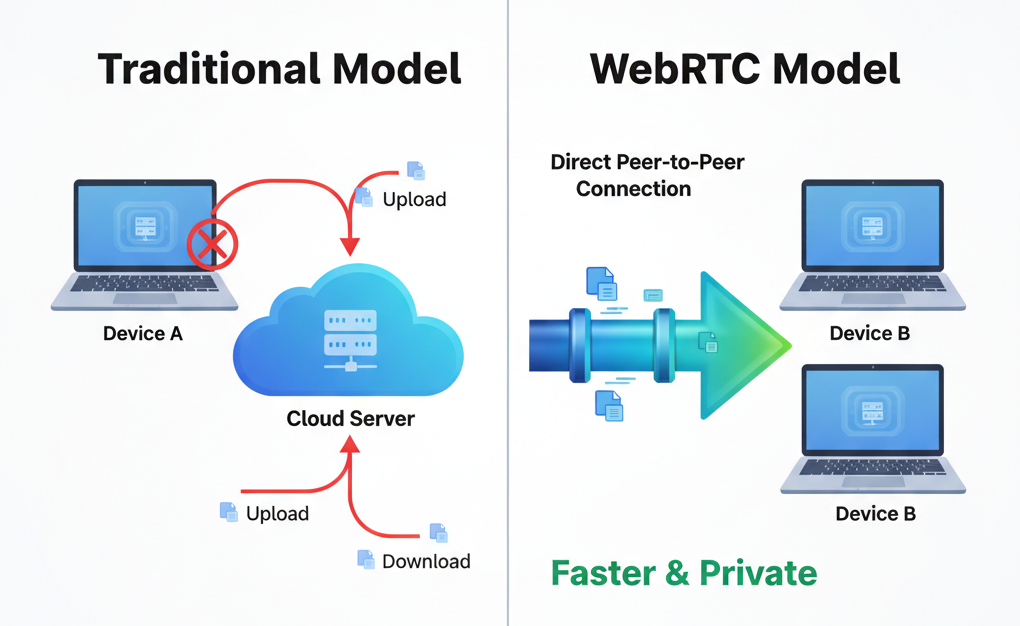
In the Traditional Model, the server sits in the middle. It listens to everything and relays messages. In the WebRTC Model, the browser establishes a direct Peer‑to‑Peer (P2P) connection. Once that connection is made, the server steps out of the way.
How It Works: The "Handshake"
You might be wondering: If there is no server, how does my computer find yours?
This is the tricky part. Computers behind home routers don't have public IP addresses that make them easy to find. To solve this, WebRTC uses a process called Signaling.
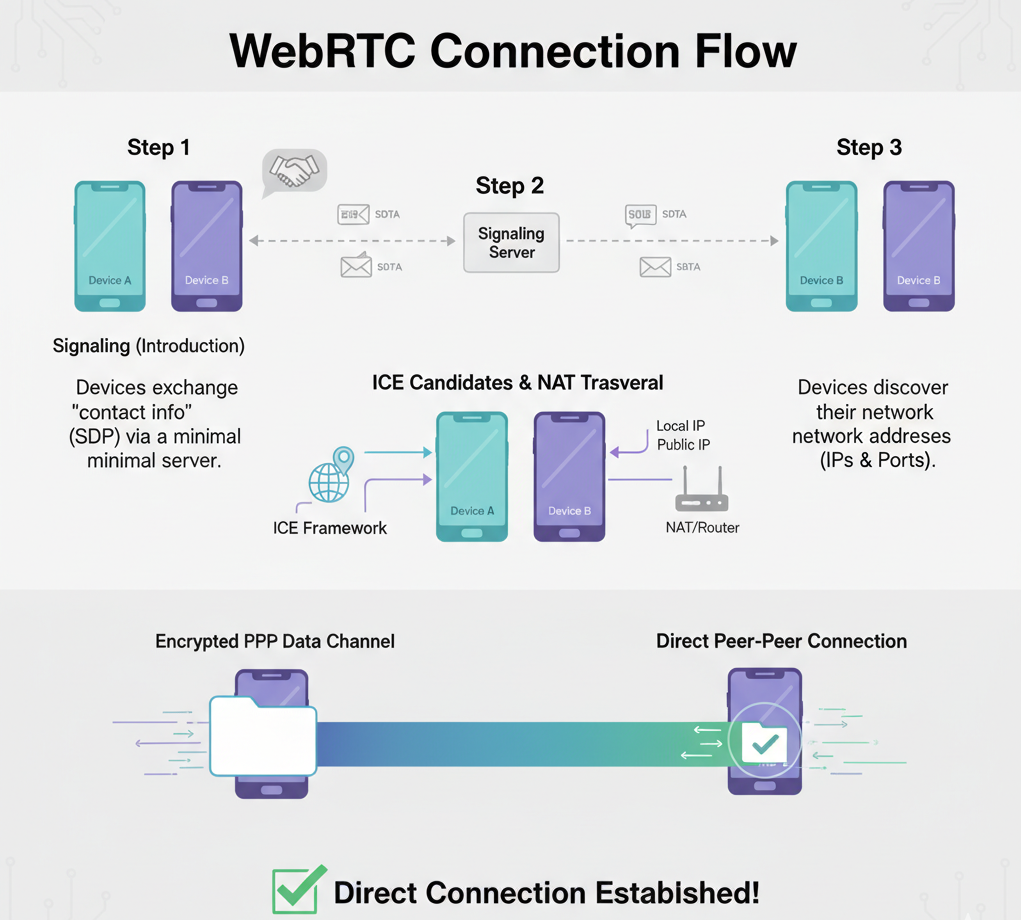
Here is the step‑by‑step workflow:
- Signaling (The Introduction): Device A and Device B use a simple web server (the Signaling Server) just to say "Hello" and exchange contact info. They swap Session Description Protocol (SDP) data.
- ICE Candidates (The Map): The devices use a framework called ICE (Interactive Connectivity Establishment). They figure out their own network addresses (IPs and Ports).
- The Connection: Once they trade these addresses via the signaling server, the browsers attempt to connect directly.
- Local Network Magic: If both devices are on the same Wi‑Fi network, WebRTC is smart enough to see that. It won't route traffic over the internet. Instead, it connects via your Local Area Network (LAN).
Why Local Wi‑Fi Sharing is Better
When WebRTC establishes a connection over your local Wi‑Fi, three amazing things happen:
- Blazing Speed: You are no longer limited by your Internet Service Provider's upload speed. You are only limited by your router's speed. Transferring gigabytes takes seconds, not hours.
- Privacy: Since the file transfer is Peer‑to‑Peer, the file data never touches an external server. It goes strictly from Device A to Device B.
- No Installation: Because WebRTC is built into Chrome, Firefox, Safari, and Edge, you don't need to install software. It just works in the browser.
See It In Action: Local Share
Theory is great, but let’s see it work. A perfect example of this technology implementation is Local Share.
This is a web‑based tool that utilizes WebRTC to create a tunnel between devices on the same network.
How to use it:
- Step 1: Open /local-share on your computer and start a session (the sender).
- Step 2: The site will generate a unique CODE or offer a QR code.
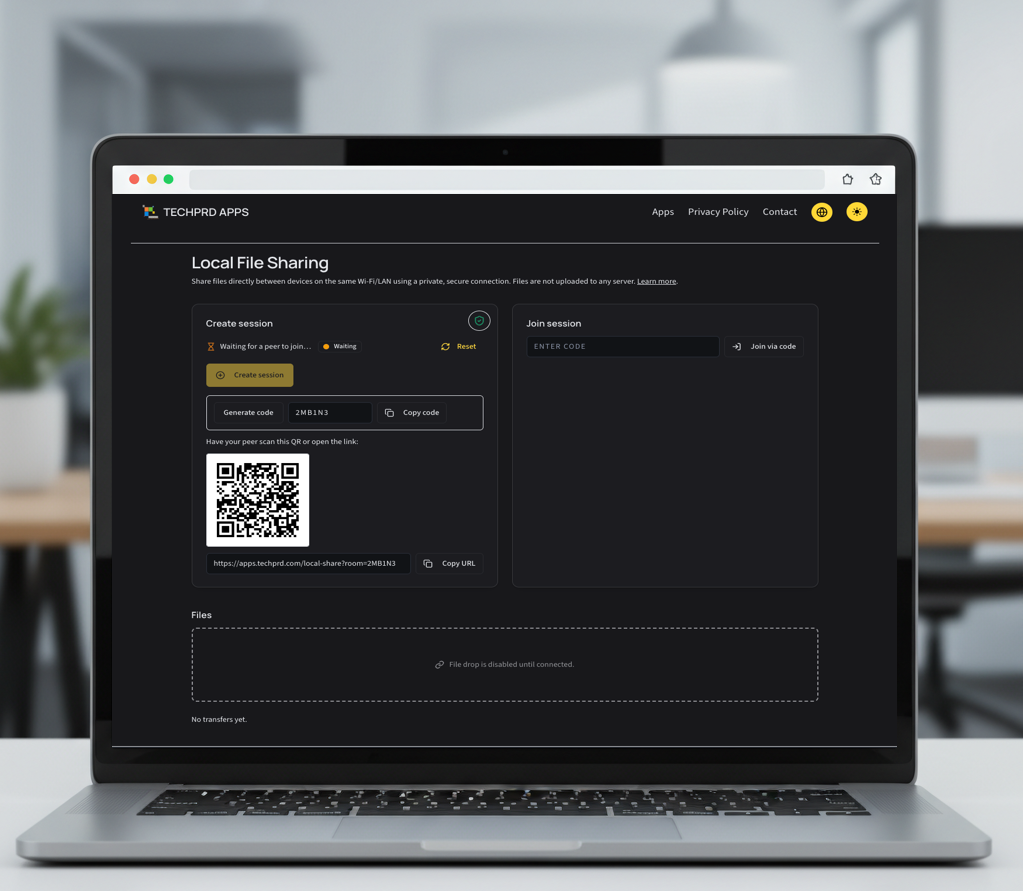
- Step 3: Open the same link on your phone or second computer (the receiver) and enter the CODE (or scan the QR code).
- Step 4: Drag and drop a file.
- Step 5: Watch the progress bar fly.
Because Local Share utilizes the WebRTC principles we discussed, the file isn't uploading to the cloud. It is streaming directly across your living room airwaves from one device to the other.
Note: VPNs (e.g., Cloudflare WARP) can prevent local WebRTC peer‑to‑peer connections. For best results, pause/disable VPNs or enable their “Allow local network/LAN access” option on both devices while using Local Share.
The Future is Decentralized
WebRTC is changing the way we think about the web. It moves us away from a world where we rely on massive data centers for every little interaction, and toward a world where our devices can communicate naturally and efficiently.
Next time you need to move a file across the room, don't email it. Use the power of the browser.
Try it out yourself here: apps.techprd.com/local-share